
your knowledge, accessible
The Object Type Library
One shared vocabulary for everything the organization knows
Knowledge Graphs for AECO — a course for domain experts
Where we are going today
- Explain what an Object Type Library is, and why it matters beyond buildings.
- Describe the five-layer model — File → Fragments → Selectors → Entity Mentions → Canonical Entities — without writing a query.
- Tell an Entity Mention apart from a Canonical Entity.
- Explain bottom-up (AI-discovered) versus top-down (explicitly defined) canonical entities.
- 🖥️ Lab: use Cue Tuner to turn a real spreadsheet into actual Canonical Entities — no code.
What is an Object Type Library?
A shared, organization-wide catalog that says, once, what kinds of things exist in the business
Every system, every document, every AI pipeline then maps into this same catalog instead of inventing its own.
BOT gave us about ten ideas for a building
An Object Type Library does the same job for everything else the organization knows
Five layers of the model
- File — where content lives and how many copies exist
- Fragments — any subset of a document, at any depth
- Selectors — precise pointers into content
- Entity Mentions — unique occurrences of named things
- Canonical Entities — the single source of truth for each thing
Each layer builds on the previous.
Reasoning then stitches them together with inferred
relationships.
How the layers link up
- FileContent -[containsFragment]-> Fragment
- Fragment -[mentions]-> EntityMention
- EntityMention -[resolvesTo]-> CanonicalEntity
- FileContent -[about]-> CanonicalEntity (inferred)
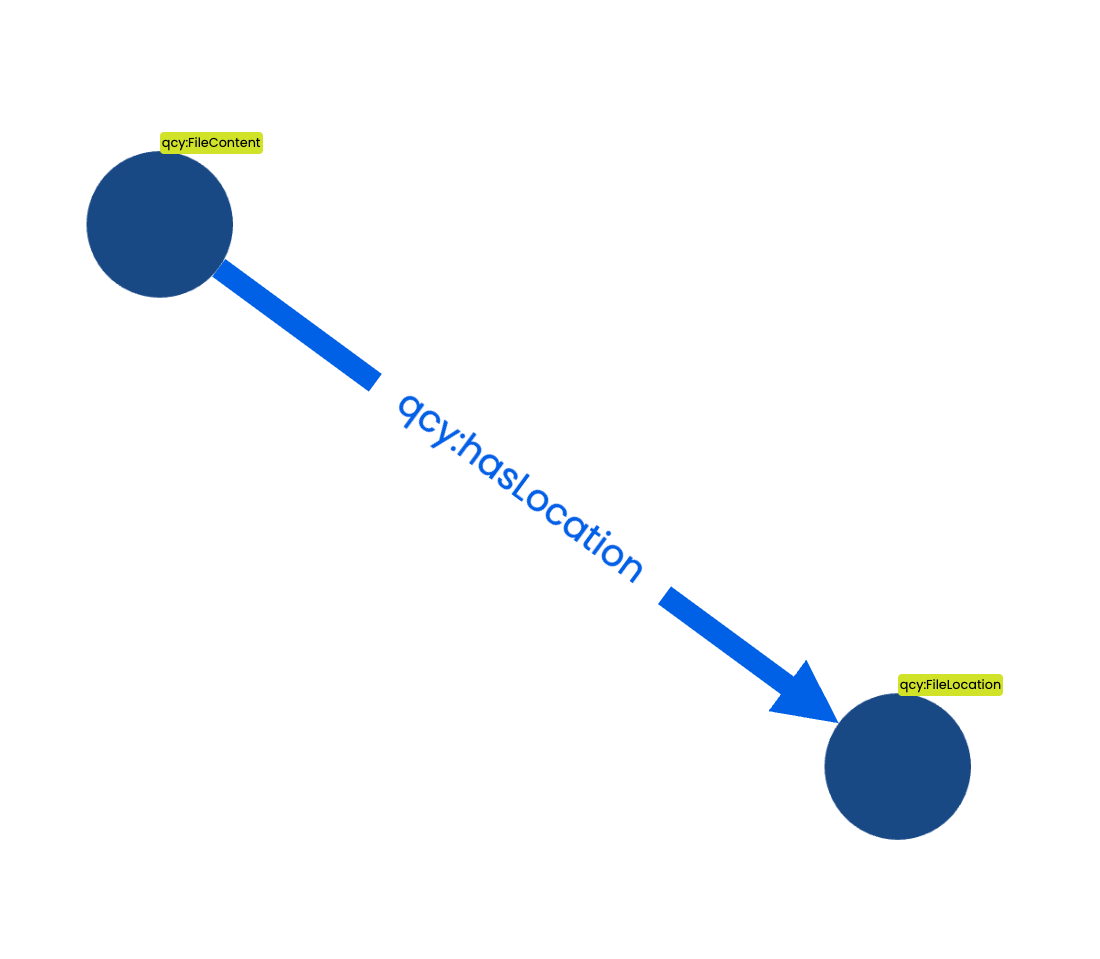
1. File Content & File Location
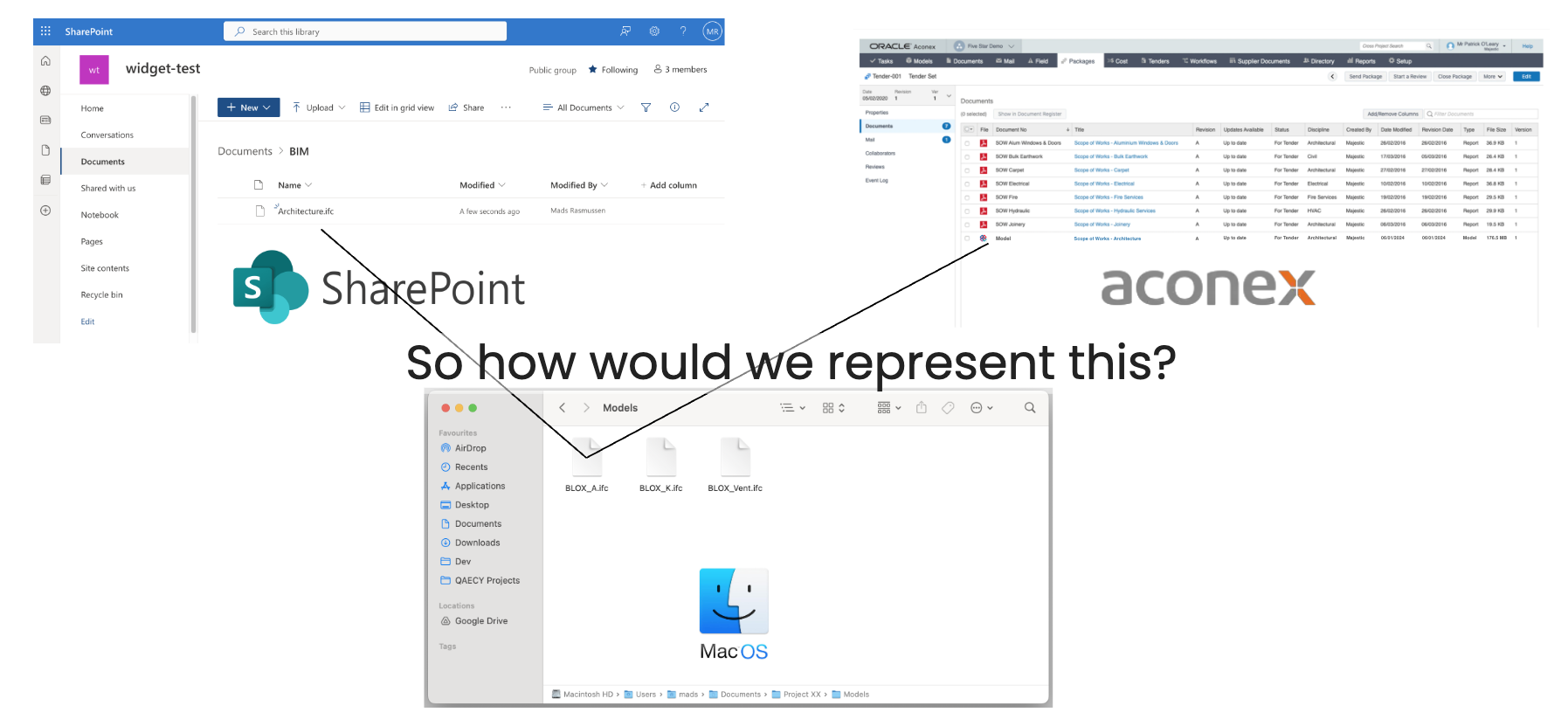
Separating what a file contains from where it lives
knowledge
graph contains the concepts File Location and
File Content
So how would we represent this?
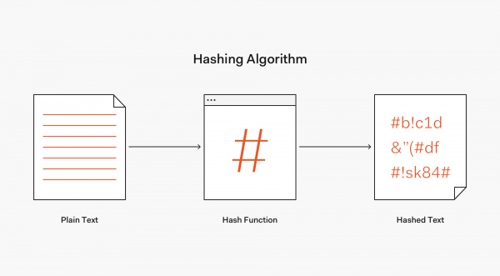
Same input = same output
File Location node id
Provider + file path
File Content node id
file content
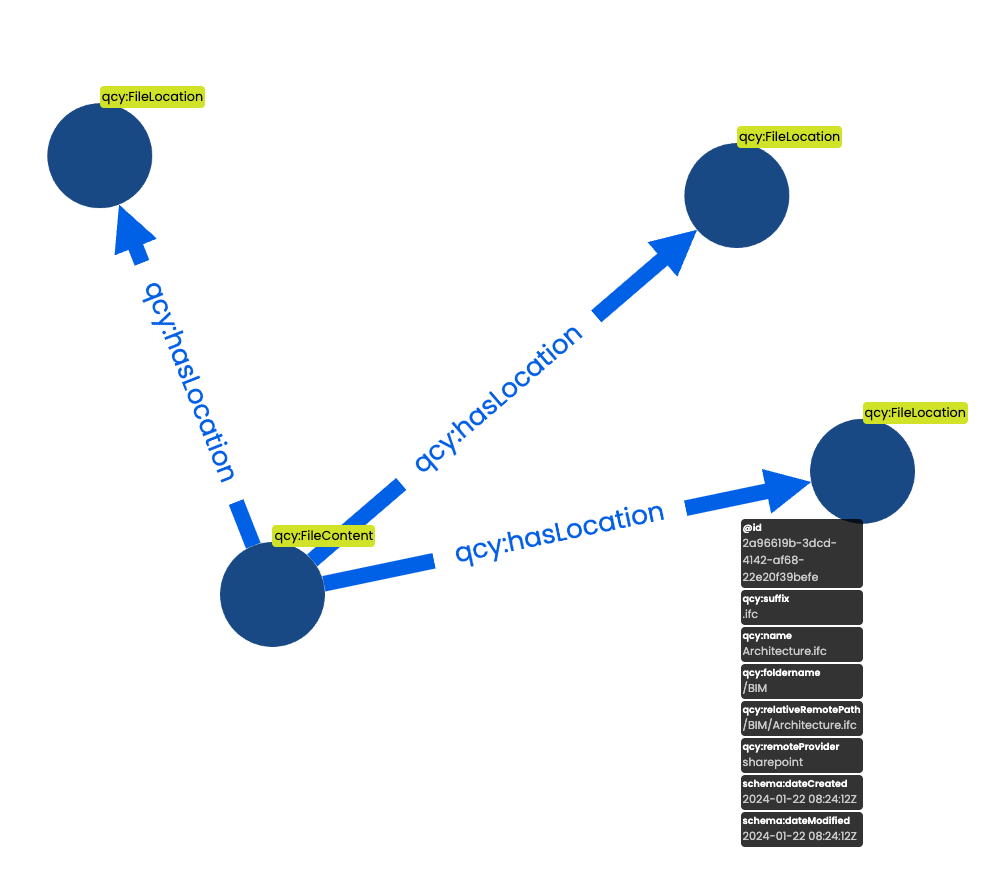
Flexibility achieved
- One file can point to several content nodes (different versions) even though its name hasn't changed.
- One content node can point to several cloud locations - one for each file.
qcy:FileContent carries metadata and
category assignments
Same content — three locations on different systems
Key data properties on qcy:FileContent
qcy:md5Hash— content fingerprintqcy:mime— MIME type stringqcy:sizeBytes— file size-
qcy:openFormat— readable without proprietary tools? qcy:language— detected languageqcy:textSummary— LLM-generated summary
Key data properties on qcy:FileLocation
qcy:filePath— relative path on the providerqcy:suffix— file extensionqcy:remoteRelativePath— provider-specific path-
qcy:remoteProvider→qcy:ProviderType
(Azure, AWS, GCP, Aconex, local, …)
2. Fragments & Selectors
Every subset of a document is a first-class citizen
Fragment Node
Any subset of a document is referred to as a Fragment and each Fragment can have sub-fragments in any arbitrary depth
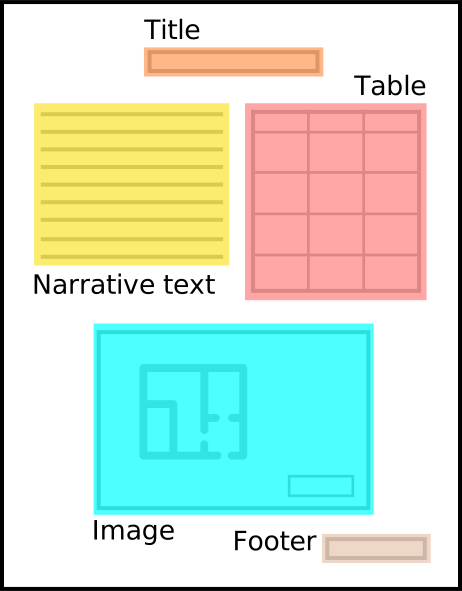
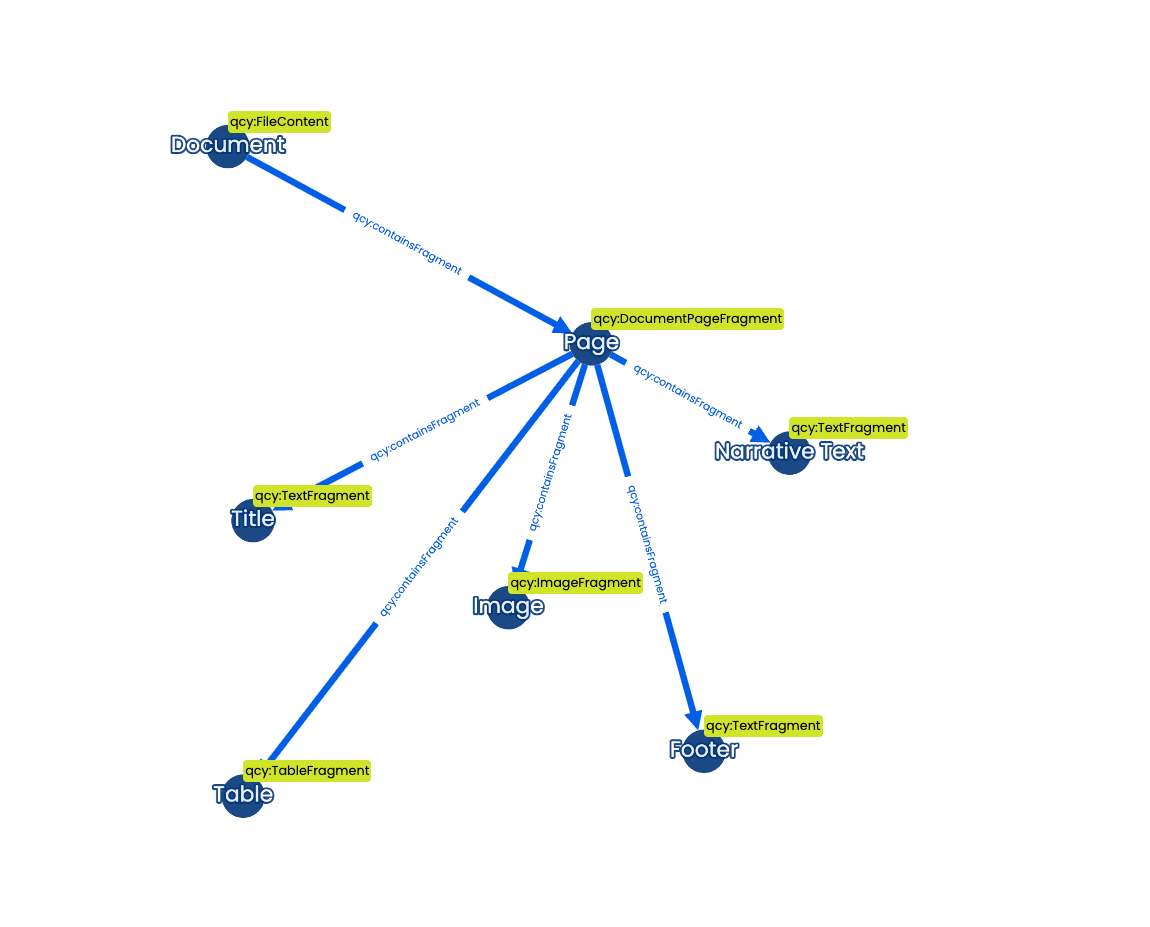
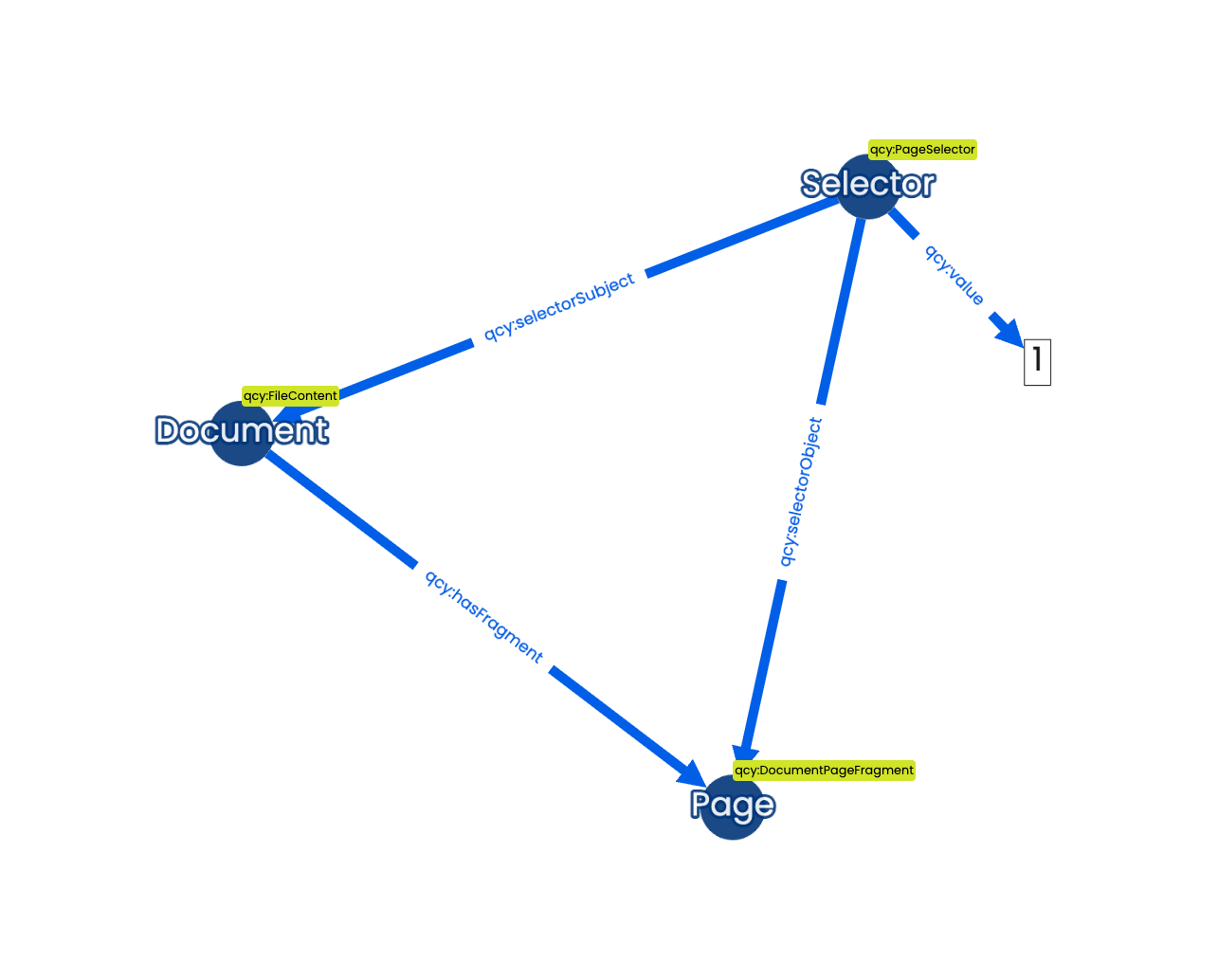
Selector Node
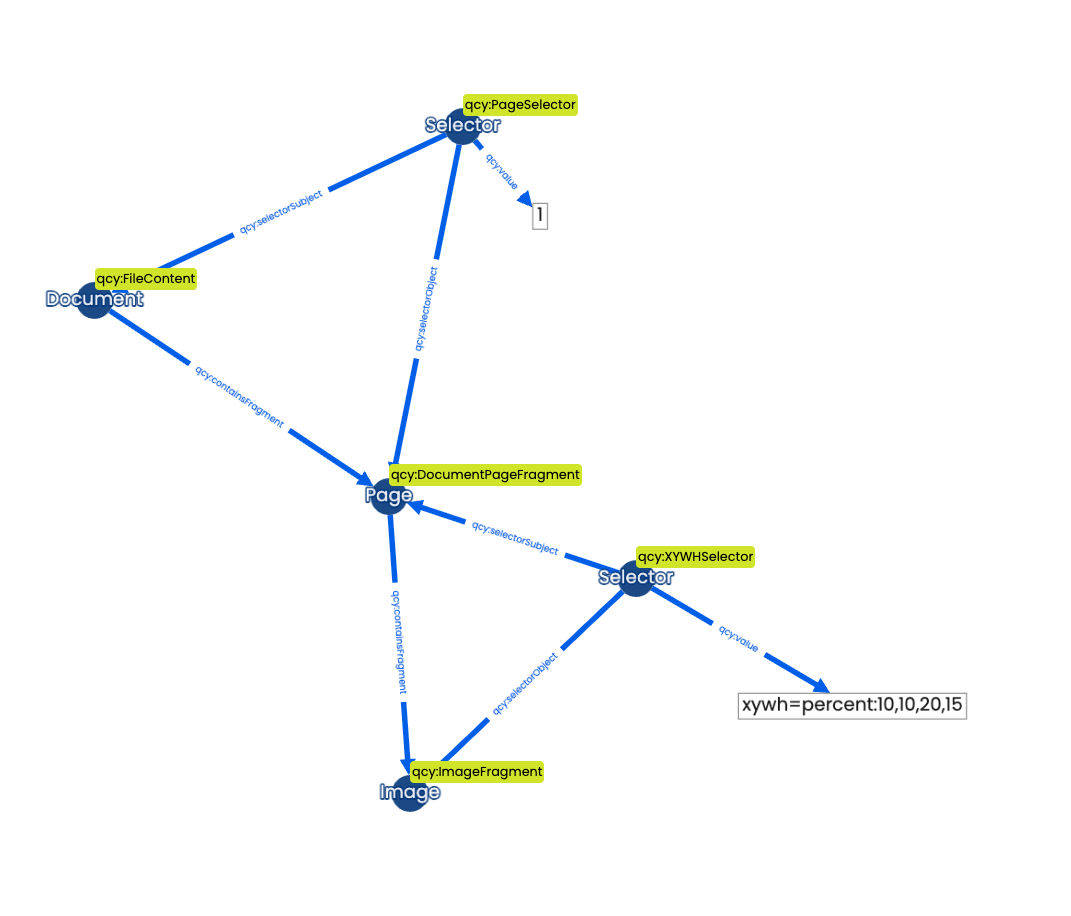
Information such as the page number or the fragment position relative to its parent can be expressed using Selectors
Fragment subtypes
-
qcy:DocumentPageFragment— a page in a paginated document qcy:TextFragment— a passage of textqcy:ImageFragment— an image or figure-
qcy:TableFragment— a table with rows and columns
Document → Pages → sub-fragments at any depth
Selector types
qcy:PageSelector— page number (integer)qcy:XYWHSelector— bounding box on a page-
qcy:TextIndexSelector— character range"start,end" -
qcy:TextDirectiveSelector— text fragment syntax#::text=… qcy:IFCExpressIDSelector— IFC line numberqcy:IFCGlobalIDSelector— IFC GlobalId-
qcy:IDSelector— generic identifier (XML, JSON, …) -
qcy:TimeRangeSelector— time range in media files
qcy:PageSelector locates the page,
qcy:XYWHSelector locates the image within
it
Reasoning derives qcy:containsFragment
implicitly from selectors — you never need to assert it manually.
INSERT {
    GRAPH <implicit> {
        ?sub qcy:containsFragment ?obj
    }
}
WHERE {
  ?sel a qcy:Selector ;
       qcy:selectorSubject ?sub ;
       qcy:selectorObject  ?obj .
  ?obj a qcy:Fragment .
  FILTER NOT EXISTS { ?sub qcy:containsFragment ?obj }
}3. Entity Mentions
Every occurrence of a named thing in a document is unique
One process in the
pipelines is
finding mentionings of Entity References in the
content of any document
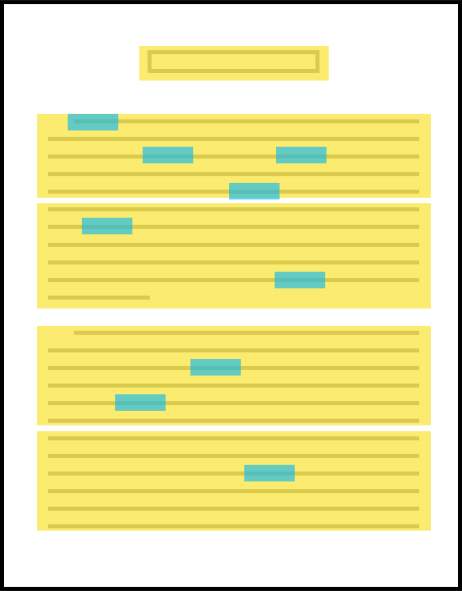
Default entities: Company, Person, Address, Material ...
Other: custom entities defined per project
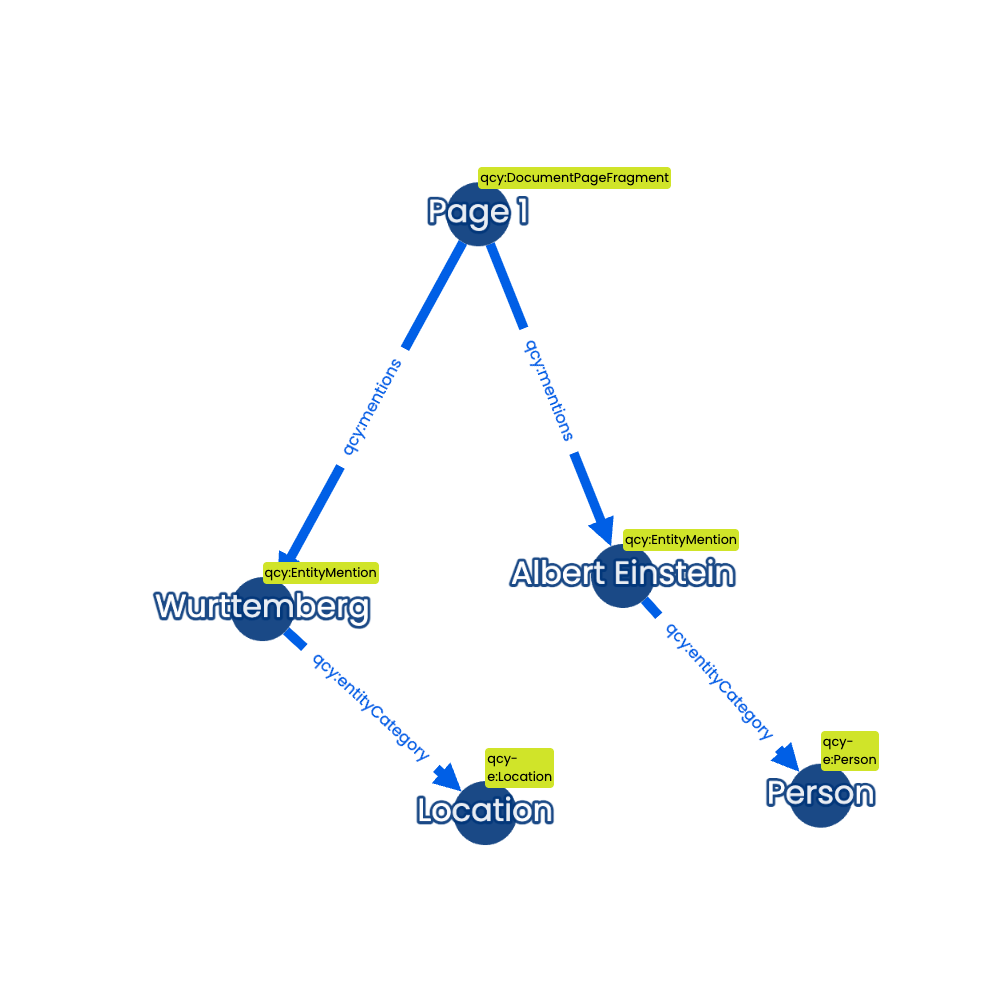
Selectors can further specify where in the parent fragment it is found. For example specified as a bounding box or with an index range in a text.
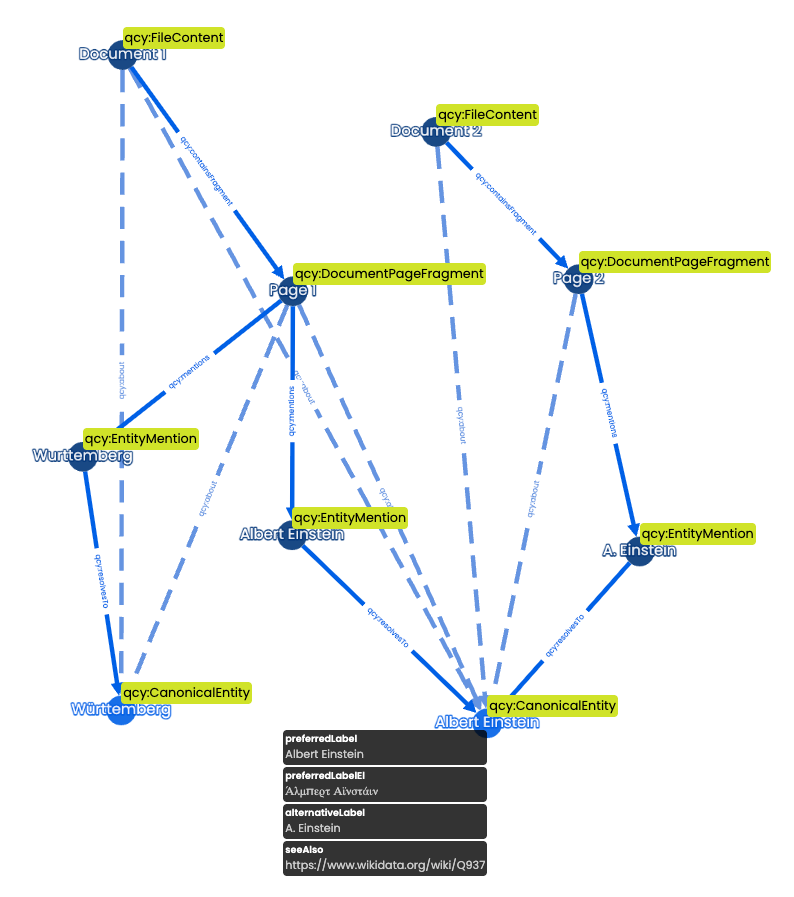
All Entity Mentions are unique, so Albert Einstein in one document is not directly considered the same as Albert Einstein or A. Einstein in another document.
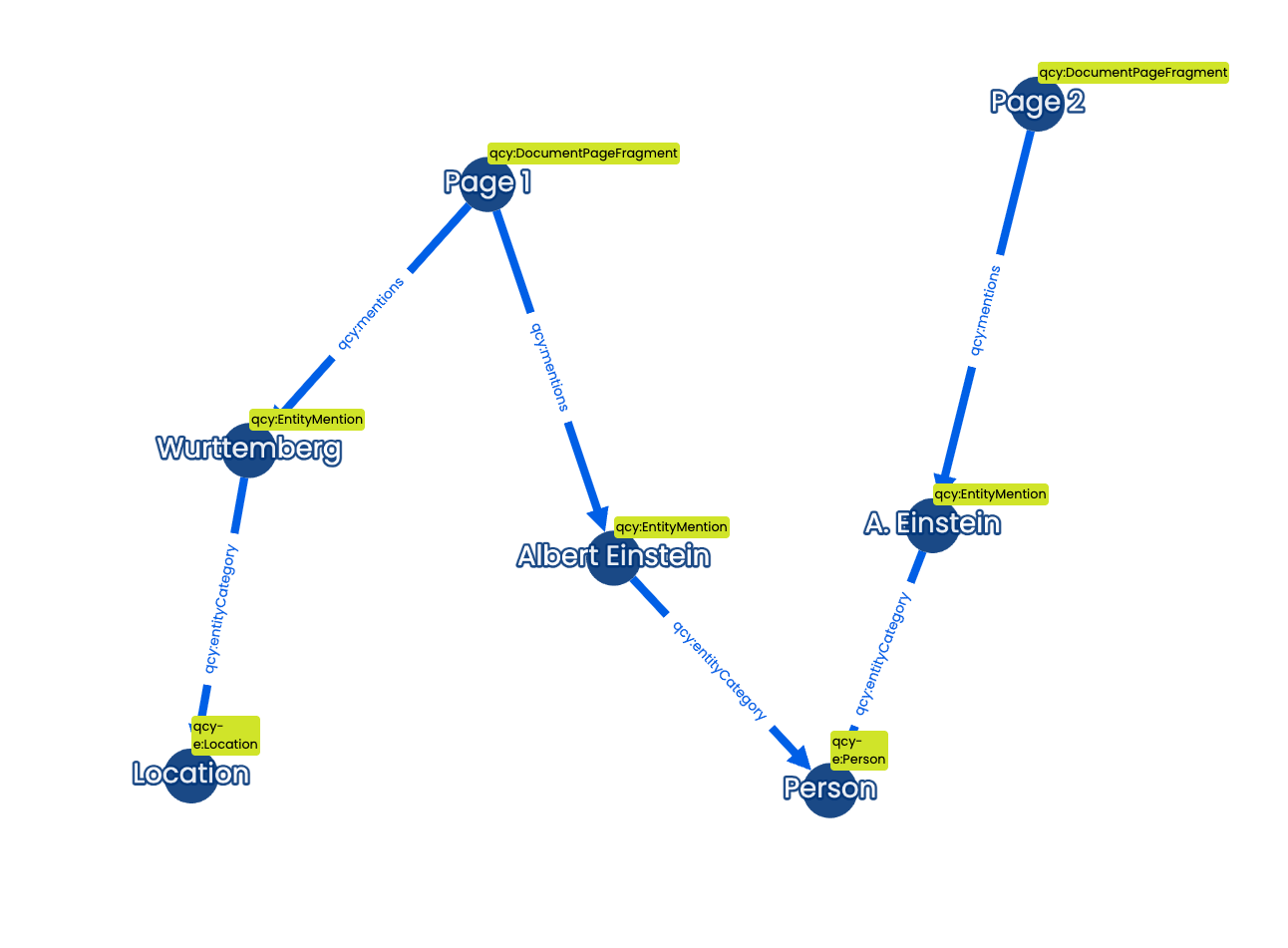
Entity Resolution
A follow-up process in the pipelines, is the entity resolution step, where we link similar entities
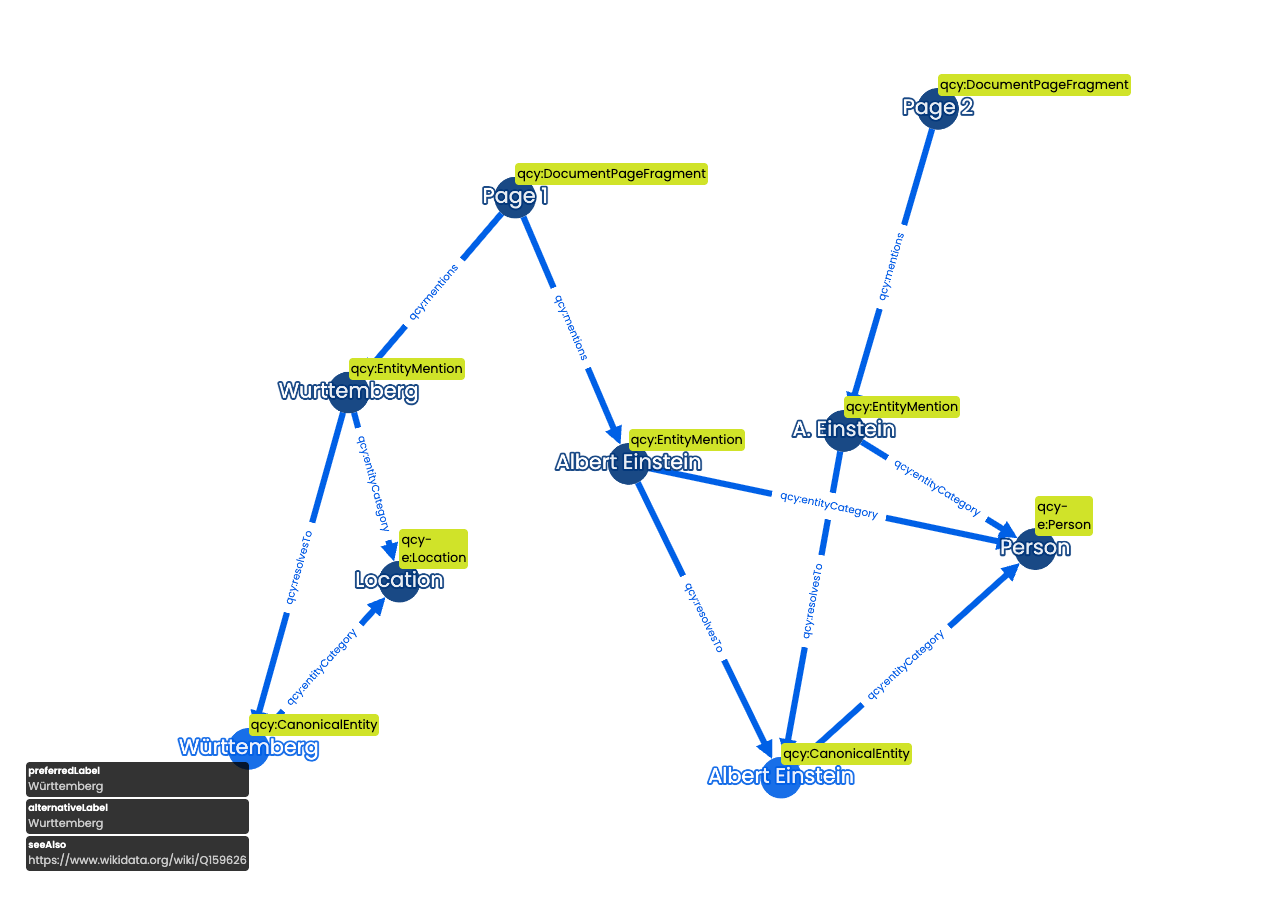
Canonical Entities
the standardized representations of Named Entities
For Canonical Entities there will be only ONE Albert Einstein that refers to all individual occurrences
The Asset Owner's HVAC unit
Three unrelated records that happen to describe the same physical object — and nobody notices until a warranty dispute forces someone to prove it.
With canonical entities, all three Entity Mentions resolve to one Canonical Entity.
Multiple mentions of the same location resolve to one
qcy:CanonicalEntity
Key properties on qcy:CanonicalEntity
qcy:label— preferred English labelqcy:explicit— user-confirmed entity?-
qcy:hasFoundingMention→ the mention that established this entity -
qcy:hasEntityCategory→ category (Person, Wall, Space, …) -
qcy:similarTo→ linked open data (Wikidata, OpenStreetMap, …) -
qcy:hasProperty→ additional key-value facts qcy:confidence— resolution confidence
Canonical entities also inherit the relations found between their entity mentions:
INSERT {
    GRAPH <implicit> {
        ?c1 ?rel ?c2
    }
}
WHERE {
  ?m1 a qcy:EntityMention ;
    ?rel ?m2 ;
    qcy:resolvesTo ?c1 .
  ?m2 a qcy:EntityMention ;
    qcy:resolvesTo ?c2 .
  FILTER(?m1 != ?m2)
  FILTER NOT EXISTS { ?c1 ?rel ?c2 }
}
Relations like qcy:elementHasMaterial,
qcy:contractInvolvesParty, or
qcy:associatedWith automatically propagate from
mentions to canonical entities.
Wall (mention) -[elementHasMaterial]-> Concrete (mention)
∴ Wall (canonical)
-[elementHasMaterial]-> Concrete (canonical)
Reasoning does the tedious work for you
Nobody has to manually tag a contract as "related to Building 4". It falls out of the links that are already there.
Explicit Canonical Entities
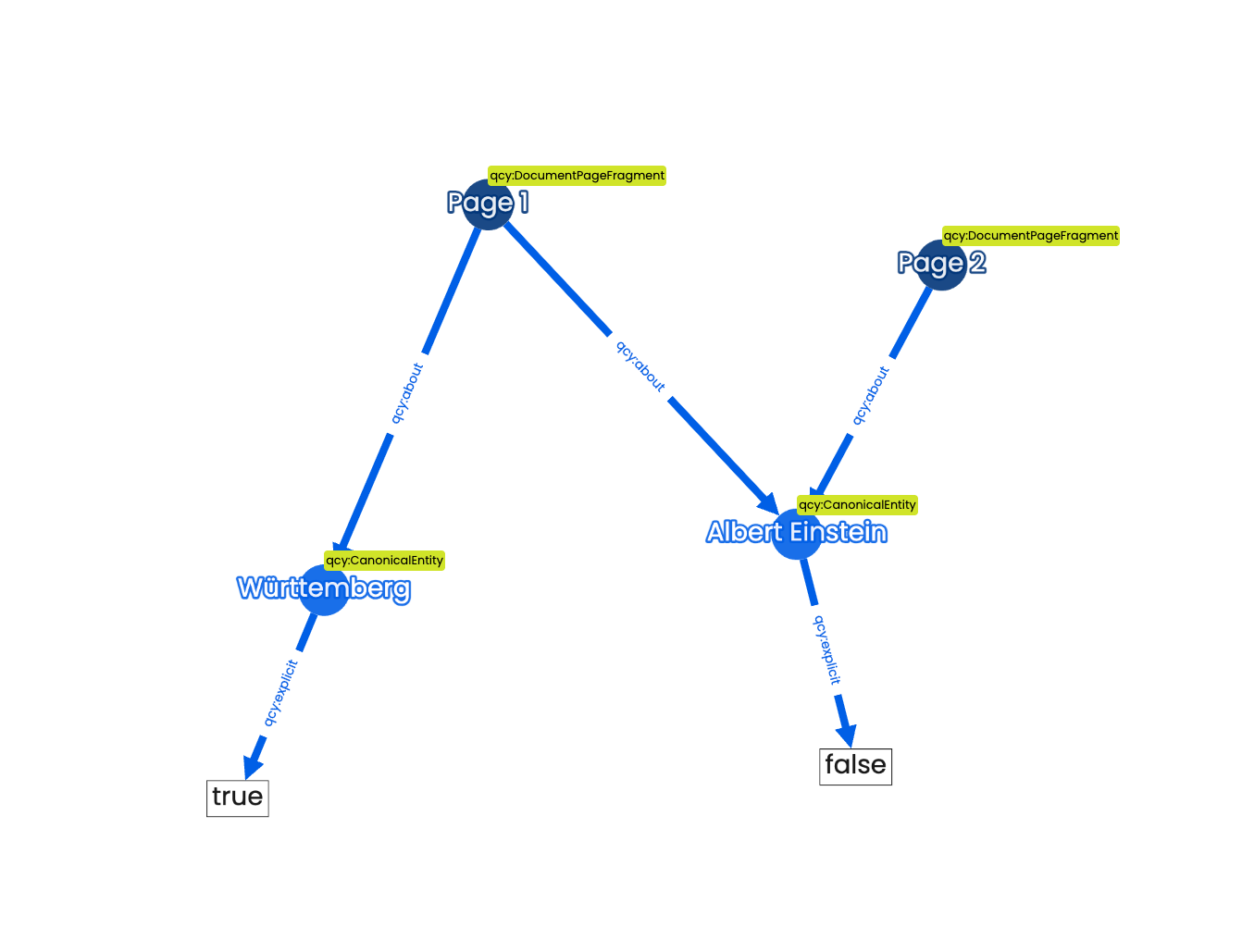
Most Canonical Entities in our pipelines are created by AI but it is also possible to define Explicit Canonical Entities in a project.
These are entities that are well defined in the project.
For example from a room programme or a project member list.
The approach can be:
top-down
Here is the list of people - only resolve to those
bottom-up
Show me what you found and I will flag the relevant ones as explicit
Two creation modes
All entity mentions are processed by the pipeline. Similar mentions are clustered and resolved to a canonical entity.
A project practitioner defines a list of canonical entities — e.g. from a room programme or member directory. Only mentions matching this list are resolved.
Trusted entities
- "List all unique windows in building A and all the properties assigned to them"
- "Show slabs and ventilation equipment on first to second floor"
Which list is yours?
"List all unique windows in Building A and every property assigned to them" — impossible across five model files, trivial once they're canonical entities.
Define the zoning categories once, top-down, so every future document resolves to the same official taxonomy.
The asset register becomes the authoritative list every AI-discovered mention must resolve against.
Built to work at project scale
+1 million documents
in a single knowledge graph
Entity resolution, cross-document linking, provenance tracking and graph traversal — all working reliably at that volume
That is not a trivial engineering problem. We have solved it.
What the graph enables
-
"List all documents about Storey 2" — query
qcy:about -
"Which elements are made of concrete?" — query
qcy:elementHasMaterialon canonical entities -
"What is this document about?" — read
qcy:abouton theqcy:FileContent -
"Trace entity X back to its source" — walk
qcy:hasFoundingMention→qcy:selectorObject→ fragment → document
Four pillars
The knowledge foundation — built from all your project documents
Shape the index to your business — connect your data, define your rules
Not covered in this course
An AI agent that reasons across your entire project knowledge
02 — Cue Tuner
Shape the index to your business
Before you start a project, the Tuner lets you define exactly what you care about
- Specific entities or relationships to extract
- Internal classification codes and breakdown structures
- Business rules unique to your organisation
Tell the Tuner what your classification codes mean
AEC projects use coding systems to name documents — discipline codes, floor numbers, project stages, revision labels
Once the Tuner knows the mapping, you can search in plain English:
“Mechanical plan for the third floor in project stage 3”
No need to know the code — the index resolves it for you
Connect your existing data to the graph
Define mappings once — your structured data becomes part of the knowledge graph
Then validate what you've built
Run automated QA against the knowledge representation — checking for missing data, inconsistencies and rule violations
Precise rule-based checks and fuzzy matching to catch near-misses your team would never find manually
Exercise Part A: "Sort the index cards"
Always run this first. No computers.
In groups, 20 minutes.
- You get a deck of cards. Each card is one mention of an object, as it appears in a different source.
- Sort the deck into piles — one pile per real-world object.
- Justify every grouping out loud: why are these the same thing?
Careful — some cards are decoys.
You just did entity resolution by hand
Each pile is a Canonical Entity. Each card in it is an Entity Mention. Your justification is the confidence.
Did any group leave a card unsorted? Good — so does the pipeline.
🖥️ Hands-on lab, Part B
"From spreadsheet to Canonical Entities"
Requires a Cue sandbox project
In groups, 45 minutes. No code at any point.
- Connect your spreadsheet as a data source.
-
Decide the category. Does your data fit a
predefined EntityCategory — a room list into
Space— or do you need a custom one? - Map the columns to properties and relationships.
- Run it, and confirm the Canonical Entities now exist in your project.
Predefined or custom?
Use the built-in catalog — Person, Organization, Space, Asset,
and so on. A room list maps straight to
Space.
Define your own in the Tuner's category app, for something specific to your organization: "Lease Clause", "Valve Type", "Inspection Zone".
Choosing between these is the act of designing an Object Type Library.
Your Object Type Library, so far
Fill in the blanks with the object types your organization actually deals with. Keep this sheet — you finish it tomorrow.
Note what did not happen
Nothing was migrated. Nothing was deleted. The spreadsheet still sits exactly where it was — its rows just have a permanent, connected identity now.
Key takeaway
"I don't need one system to rule them all — I need one shared vocabulary of object types so that everything I already have can point to the same thing."
Tomorrow
You put your own data into the graph. Tomorrow you ask it questions in plain English — and see the answer come back sourced to the rows you loaded today.
Day 6 — The knowledge graph as integration layer